Travel agencies
WhatsApp CRM for travel agencies: how to stop losing bookings inside the chat
Most agencies in the Gulf don’t lose customers to cheaper competitors. They lose them in the gap between a WhatsApp message and the person who should have answered it. Here is where that gap is, and how to close it.
In this article
Picture a Thursday evening three weeks before Ramadan. The office phone has WhatsApp Business on it, and it’s sitting on the desk between two colleagues. There are 46 unread chats. One customer has asked the price of the 7-day Umrah package twice. Another sent a voice note at 6pm asking whether the hotel is walking distance from the Haram, and the colleague who knows that hotel went home an hour ago.
By Saturday, the customer who asked twice has booked with someone else. Nobody did anything wrong, exactly. The message just didn’t belong to anyone.
That’s the real problem a WhatsApp CRM for travel agencies solves. Not “automation”, not “AI”. Ownership. Every message has a person, every person can see what was said before, and the manager can see what’s waiting.
Where travel agencies actually lose bookings on WhatsApp
We’ve watched agencies of three people and agencies of thirty work their WhatsApp. The leaks are almost always the same five.
1. The evening message nobody saw
Travel customers write when they’re free: after work, after Isha, on the weekend. If the only copy of the chat is on a phone in a drawer, the first person to see it is whoever opens the office in the morning. By then the customer has asked three other agencies.
2. “Let me check and come back to you”
This is the most expensive sentence in travel sales. The agent needs to confirm a hotel rate or a flight, says they’ll come back, and then the chat sinks under forty newer ones. There’s no reminder, no status, nothing that says “this one is still open”.
3. Two people, two different prices
When the team shares one phone or several linked devices with no assignment, two colleagues answer the same customer. One quotes the old package price, the other the new one. The customer now trusts neither.
4. The leads live on one employee’s phone
Plenty of agencies let each salesperson sell from their own number. It works until that person leaves, and takes every customer conversation, every quote and every repeat Umrah family with them.
5. No idea what’s working
Which number brings the bookings? How long does a customer wait for a first reply on a Friday? Who on the team closes and who just chats? With a phone, you can’t answer any of these. You guess.
What a WhatsApp CRM is (and what it isn’t)
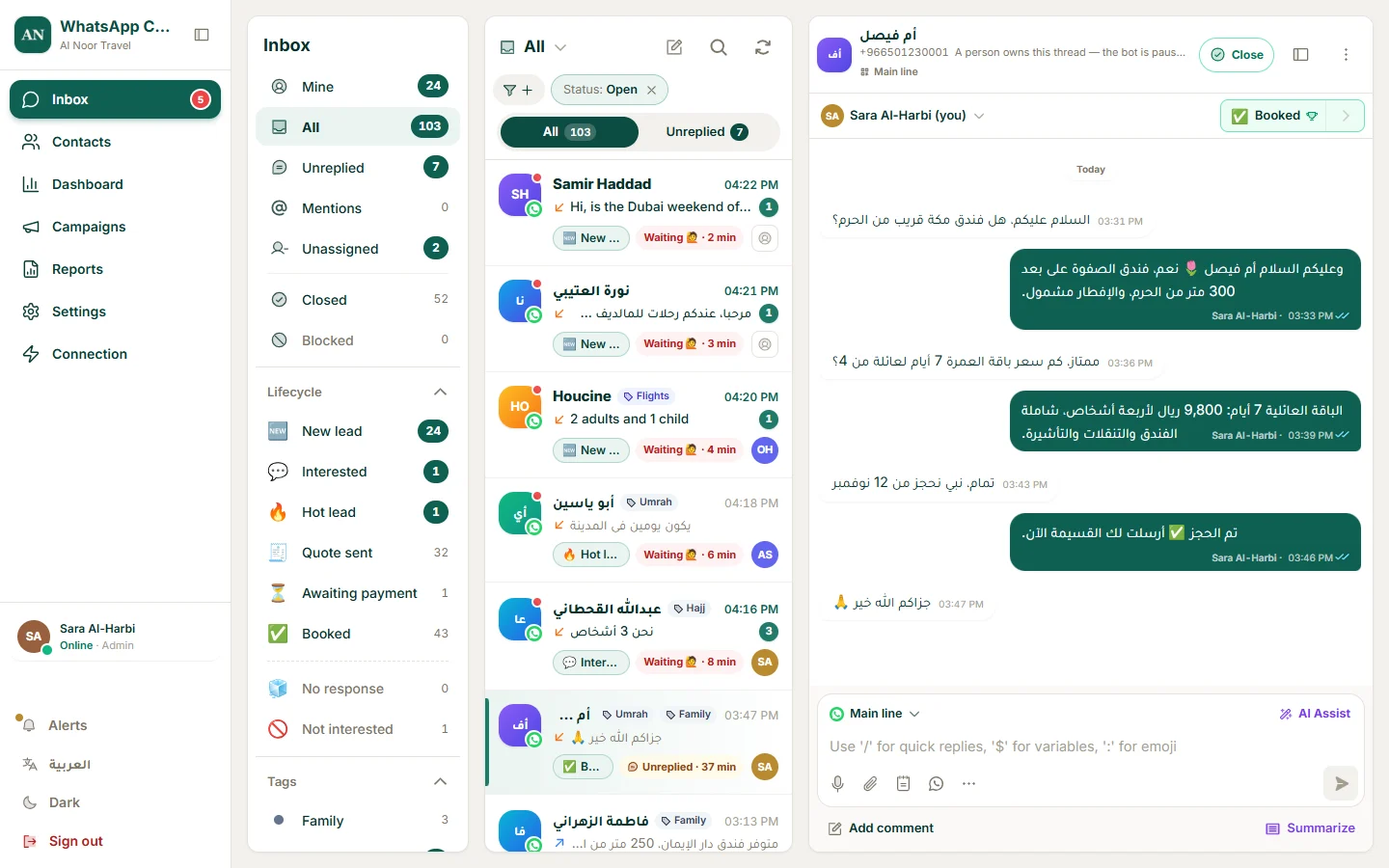
A WhatsApp CRM is a shared workspace on top of your WhatsApp number. Customers keep writing to the same number they always have. Behind it, your team sees one inbox instead of one phone, and every conversation carries a contact record: name, tags, the stage of the deal, notes, and who it’s assigned to.
It is not a bulk-message blaster. Tools that promise thousands of messages a day from a normal number get numbers banned, and they’re a different product with a different audience. For a travel agency the value is in the conversations customers start themselves: enquiries, quotes, changes, and the questions the night before departure.
The features that matter for a travel agency
Every CRM brochure lists fifty features. In practice, these are the ones an agency feels in the first month.
One inbox for every number
Many agencies run two or three numbers: a main line, an Umrah desk, maybe a visa number. A good shared WhatsApp inbox puts them in one list, and every chat shows which number the customer wrote to, so the reply goes out from the same one.
Assignment that doesn’t rely on memory
Each conversation should have an owner. Either a manager assigns it, or it’s handed out automatically to whoever is online, in turn. When the owner is off, a colleague can see the whole history and pick it up without asking the customer to repeat themselves.
Stages that match how you actually sell
Generic CRMs come with “Lead, Opportunity, Closed Won”. Agencies think in different words. Something like New enquiry → Quote sent → Awaiting payment → Booked → Travelled lets a manager open the pipeline and see, for example, eleven families who got an Umrah quote this week and haven’t paid. That list is worth more than any campaign.
Internal notes and @mentions
“@Sara this one is a VIP, can we upgrade the room?” should be written next to the chat, not in a separate group where it gets lost. Notes stay inside the team; the customer never sees them.
Saved offers and quick replies with real prices
If your team types the same package description twenty times a day, they’ll type it slightly differently twenty times. Save the package once, with the price, what’s included and the dates, and send it with a tap. Prices stay consistent, and new staff sound like your best salesperson on day one.
Notifications on the phone, not just the desktop
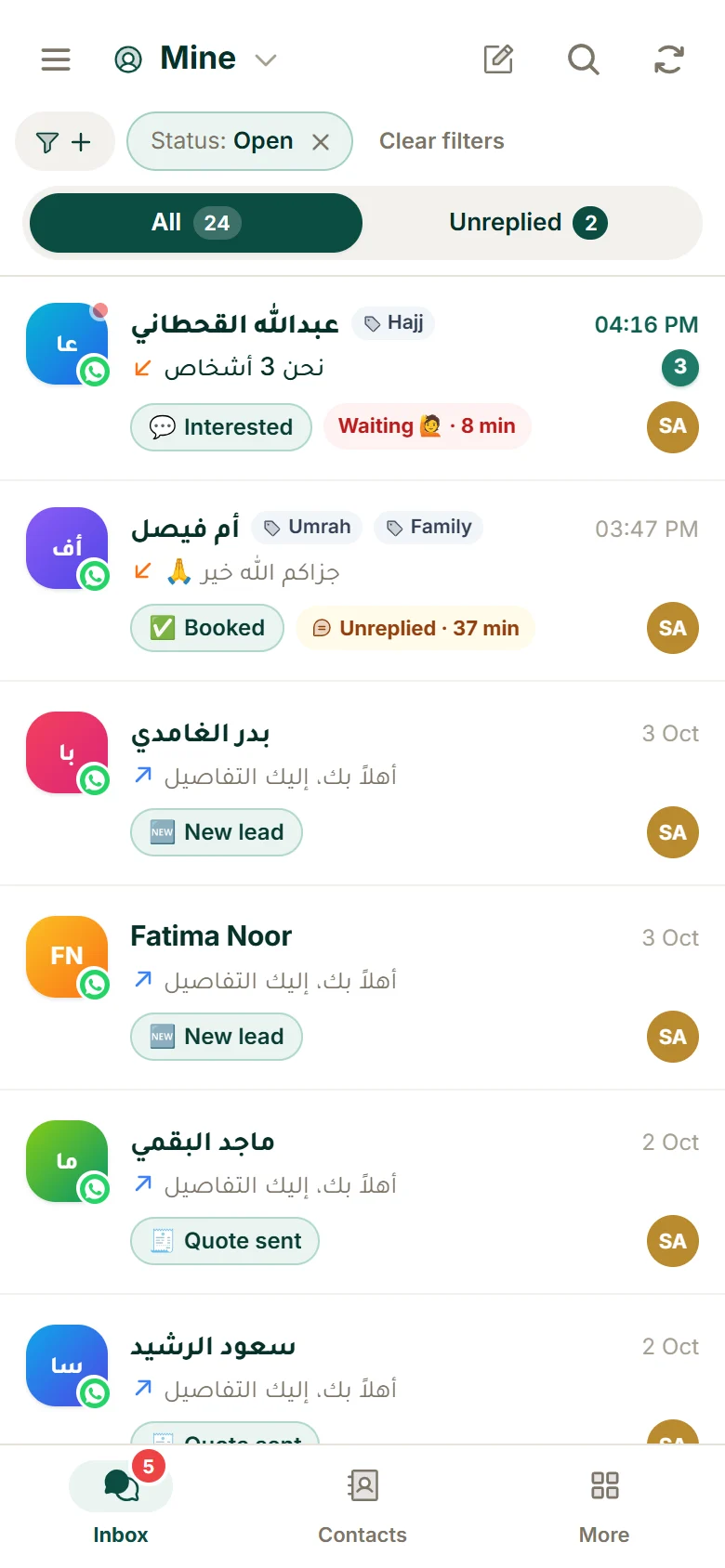
Your staff aren’t at a desk all day. Push notifications on the phone, for the chats assigned to them or for any new message, are what makes the evening enquiry get answered the same evening.
Reports a manager will actually read
First-reply time, chats per agent and conversations by stage. Three numbers, every week. That’s enough to see who needs help and which days you need another person on shift.
Official WhatsApp API or your normal number?
This is the first technical question every agency asks, and the honest answer is: it depends on what you plan to do with the number.
- If customers write to you and your team answers, which is most of travel sales, you can link the number you already have, keep it on your phone, and pay nothing to WhatsApp for the messages. The catch is that this number should be answered by people only: no chatbot, no broadcasts.
- If you want a chatbot, campaigns to past customers, or a verified business profile, you need the official WhatsApp Business Platform (the API). Meta then charges per template message, mostly for marketing ones.
We wrote a full comparison, with real costs and the trade-offs of each, in WhatsApp Business app vs API in 2026.
A one-week setup plan for your team
You don’t need a consultant or a three-month project. This is the order we’d do it in.
- Day 1. Connect your numbers and invite the team. Every number in one inbox; each colleague signs in with their own account, so you can see who said what.
- Day 2. Set your stages and five tags. Keep it short: the stages from enquiry to booked, and tags like Umrah, Family, Visa, Flights, VIP. You can always add more later. People rarely do.
- Day 3. Save your offers. Your top ten packages, with price, inclusions and dates. Then the five answers you type most: payment details, documents needed for a visa, check-in times.
- Day 4. Decide who answers what. Round-robin across the team, or one person per number. Write it down; turn on auto-assignment if it fits.
- Days 5 to 7. Watch one number: Unreplied. Look at it at noon and at 9pm. If it’s not near zero, you don’t have a software problem, you have a shift problem, and now you can see it.
What to check when you compare platforms
Most WhatsApp CRMs are built in Europe, India or Southeast Asia and translated later. For an agency in Saudi Arabia or the Gulf, these are the questions that separate them:
- Does Arabic really work? Not just a translated menu. Right-to-left chats, Arabic search, Arabic names in reports.
- Is the phone app usable? Open it on your own phone during the trial and answer a real customer from it.
- What does a team of eight cost? Per-seat pricing looks cheap for one user and gets expensive fast. Ask for the price at your real team size, with VAT.
- Can you bring your history? Moving from another platform shouldn’t mean losing years of customer conversations.
- What happens on a normal number? If a tool lets you run a bot or bulk messages on a non-official number, it’s putting your number at risk. Ask.
Where Travora Hub fits
We built Travora Hub CRM inside a working travel agency’s day. The first version was a fix for exactly the Thursday evening above. Today it handles over 150,000 WhatsApp messages a month for agencies and other businesses that sell on WhatsApp.
What it does: one inbox for all your numbers, linked by QR or through the official API; assignment and auto-assignment; lifecycle stages and tags; internal notes with @mentions; saved offers; push notifications and an Android app with your agency’s own name and logo; reports; and an AI assistant that drafts replies for your team. Arabic and English, built phone-first.
What it doesn’t do (yet): Instagram and Messenger are not in the same inbox today. And on numbers linked by QR, there’s no bot and no campaigns, on purpose. Those numbers are answered by people only, because that’s what keeps them safe.
Plans start at $49 a month for a team of three, and the most common setup for an agency, eight people and three numbers, is $119. You can try it free for 7 days without a card.
Questions people ask
Can several employees use one WhatsApp number at the same time?
Is a WhatsApp CRM worth it for a small agency of two or three people?
Will my customers notice anything different?
Do I have to pay Meta for every message?
Can I keep my existing WhatsApp number?
Does it work in Arabic?
هذا المقال بالعربية: نظام CRM واتساب لشركات السياحة: كيف توقف ضياع الحجوزات داخل المحادثات